
Card
HeroUIA container that groups related content and actions.
Solidtype_heroui.Card is a <div> and its parts, with the classes HeroUI’s
own cardVariants gives. Kobalte has no card, and a card has no behaviour: a
card but a transparent one is a surface, which it gives what is inside it by
Surface.Context, as HeroUI’s does.
HeroUI’s examples, with HeroUI’s icons from @gravity-ui/icons.
Become an Acme Creator!
Visit the Acme Creator Hub to sign up today and start earning credits from your fans and followers.
module Card = Solidtype_heroui.Cardmodule Link = Solidtype_heroui.Link
let make () =  <Card class_="w-[400px]">    <Gravity.Circle_dollar      aria_label="Dollar sign icon" class_="text-primary size-6"    />    <Card.Header>      <Card.Title>"Become an Acme Creator!"</Card.Title>      <Card.Description>        "Visit the Acme Creator Hub to sign up today and start earning credits \         from your fans and followers."      </Card.Description>    </Card.Header>    <Card.Footer>      <Link href="https://heroui.com">"Creator Hub" <Link.Icon /></Link>    </Card.Footer>  </Card>
Anatomy
Section titled “Anatomy”<Card> <Card.Header> <Card.Title>"Title"</Card.Title> <Card.Description>"Description"</Card.Description> </Card.Header> <Card.Content>"Content"</Card.Content> <Card.Footer>"Footer"</Card.Footer></Card>Examples
Section titled “Examples”Variants
Section titled “Variants”Transparent
Minimal prominence with transparent background
Use for less important content or nested cards
Default
Standard card appearance (bg-surface)
The default card variant for most use cases
Secondary
Medium prominence (bg-surface-secondary)
Use to draw moderate attention
Tertiary
Higher prominence (bg-surface-tertiary)
Use for primary or featured content
module Card = Solidtype_heroui.Card
let make () =  <div class_="flex flex-col gap-4">    <Card class_="w-[320px]" variant=`transparent>      <Card.Header>        <Card.Title>"Transparent"</Card.Title>        <Card.Description>          "Minimal prominence with transparent background"        </Card.Description>      </Card.Header>      <Card.Content>        <p>"Use for less important content or nested cards"</p>      </Card.Content>    </Card>    <Card class_="w-[320px]" variant=`default>      <Card.Header>        <Card.Title>"Default"</Card.Title>        <Card.Description>          "Standard card appearance (bg-surface)"        </Card.Description>      </Card.Header>      <Card.Content>        <p>"The default card variant for most use cases"</p>      </Card.Content>    </Card>    <Card class_="w-[320px]" variant=`secondary>      <Card.Header>        <Card.Title>"Secondary"</Card.Title>        <Card.Description>          "Medium prominence (bg-surface-secondary)"        </Card.Description>      </Card.Header>      <Card.Content><p>"Use to draw moderate attention"</p></Card.Content>    </Card>    <Card class_="w-[320px]" variant=`tertiary>      <Card.Header>        <Card.Title>"Tertiary"</Card.Title>        <Card.Description>          "Higher prominence (bg-surface-tertiary)"        </Card.Description>      </Card.Header>      <Card.Content><p>"Use for primary or featured content"</p></Card.Content>    </Card>  </div>
Horizontal Layout
Section titled “Horizontal Layout”
Become an ACME Creator!
Lorem ipsum dolor sit amet consectetur. Sed arcu donec id aliquam dolor sed amet faucibus etiam.
module Button = Solidtype_heroui.Buttonmodule Card = Solidtype_heroui.Cardmodule Close_button = Solidtype_heroui.Close_button
let make () =  <Card class_="w-full items-stretch md:flex-row">    <div      class_="relative h-[140px] w-full shrink-0 overflow-hidden rounded-2xl \              sm:h-[120px] sm:w-[120px]">      <img        alt="Cherries"        class_="pointer-events-none absolute inset-0 h-full w-full scale-125 \                object-cover select-none"        loading="lazy"        src="https://heroui-assets.nyc3.cdn.digitaloceanspaces.com/docs/cherries.jpeg"      />    </div>    <div class_="flex flex-1 flex-col gap-3">      <Card.Header class_="gap-1">        <Card.Title class_="pe-8">"Become an ACME Creator!"</Card.Title>        <Card.Description>          "Lorem ipsum dolor sit amet consectetur. Sed arcu donec id aliquam \           dolor sed amet faucibus etiam."        </Card.Description>        <Close_button aria_label="Close banner" class_="absolute end-3 top-3" />      </Card.Header>      <Card.Footer        class_="mt-auto flex w-full flex-col items-start gap-3 sm:flex-row \                sm:items-center sm:justify-between">        <div class_="flex flex-col">          <span class_="text-sm font-medium text-foreground">            "Only 10 spots"          </span>          <span class_="text-xs text-muted">"Submission ends Oct 10."</span>        </div>        <Button class_="w-full sm:w-auto">"Apply Now"</Button>      </Card.Footer>    </div>  </Card>
With Avatar
Section titled “With Avatar”
Indie Hackers
148 members

AI Builders
362 members
module Avatar = Solidtype_heroui.Avatarmodule Card = Solidtype_heroui.Card
let assets = "https://heroui-assets.nyc3.cdn.digitaloceanspaces.com/"
let community ~image ~alt ~title ~members ~avatar ~avatar_alt ~fallback ~by =  <Card class_="w-[200px] gap-2">    <img      alt=(fun () -> alt)      class_="pointer-events-none aspect-square w-14 rounded-2xl object-cover \              select-none"      loading="lazy"      src=(fun () -> assets ^ image)    />    <Card.Header>      <Card.Title>(fun () -> Solidtype.Jsx.string title)</Card.Title>      <Card.Description>        (fun () -> Solidtype.Jsx.string members)      </Card.Description>    </Card.Header>    <Card.Footer class_="flex gap-2">      <Avatar class_="size-5">        <Avatar.Image alt=(fun () -> avatar_alt) src=(fun () -> assets ^ avatar)        />        <Avatar.Fallback class_="text-xs">          (fun () -> Solidtype.Jsx.string fallback)        </Avatar.Fallback>      </Avatar>      <span class_="text-xs">(fun () -> Solidtype.Jsx.string by)</span>    </Card.Footer>  </Card>
let make () =  <div class_="flex flex-wrap gap-4">    (fun () ->      Solidtype.Jsx.element        (community ~image:"docs/demo1.jpg" ~alt:"Indie Hackers community"           ~title:"Indie Hackers" ~members:"148 members"           ~avatar:"avatars/red.jpg" ~avatar_alt:"Martha's avatar"           ~fallback:"IH" ~by:"By Martha"))    (fun () ->      Solidtype.Jsx.element        (community ~image:"docs/demo2.jpg" ~alt:"AI Builders community"           ~title:"AI Builders" ~members:"362 members"           ~avatar:"avatars/blue.jpg" ~avatar_alt:"John's avatar - blue themed"           ~fallback:"B" ~by:"By John"))  </div>
With Images
Section titled “With Images”Become an ACME Creator!
Lorem ipsum dolor sit amet consectetur. Sed arcu donec id aliquam dolor sed amet faucibus etiam.
You can now withdraw on crypto
Add your wallet in settings to withdraw
Indie Hackers
148 members
AI Builders
362 members
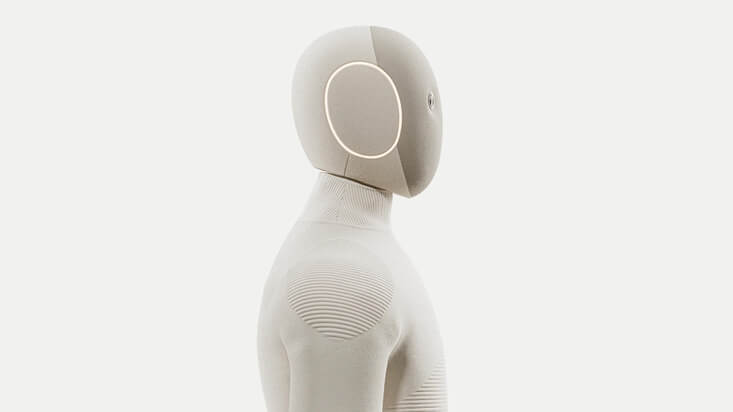
NEO
Home Robot
module Avatar = Solidtype_heroui.Avatarmodule Button = Solidtype_heroui.Buttonmodule Card = Solidtype_heroui.Cardmodule Close_button = Solidtype_heroui.Close_buttonmodule Link = Solidtype_heroui.Link
let assets = "https://heroui-assets.nyc3.cdn.digitaloceanspaces.com/"
let community ~image ~alt ~fallback ~title ~members ~avatar ~by =  <Card class_="col-span-12 gap-2 sm:col-span-6">    <Card.Header>      <Avatar class_="size-[56px] rounded-xl">        <Avatar.Image alt=(fun () -> alt) src=(fun () -> assets ^ image) />        <Avatar.Fallback>          (fun () -> Solidtype.Jsx.string fallback)        </Avatar.Fallback>      </Avatar>    </Card.Header>    <Card.Content class_="mt-1">      <p class_="text-sm leading-4 font-medium">        (fun () -> Solidtype.Jsx.string title)      </p>      <p class_="text-xs text-muted">        (fun () -> Solidtype.Jsx.string members)      </p>    </Card.Content>    <Card.Footer class_="flex items-center gap-2">      <Avatar class_="size-4">        <Avatar.Image alt="John" src=(fun () -> assets ^ avatar) />        <Avatar.Fallback>          (fun () -> Solidtype.Jsx.string fallback)        </Avatar.Fallback>      </Avatar>      <p class_="text-xs text-muted">(fun () -> Solidtype.Jsx.string by)</p>    </Card.Footer>  </Card>
let make () =  <div class_="flex w-full items-center justify-center">    <div class_="grid w-full max-w-2xl grid-cols-12 gap-4 p-4">      <Card class_="col-span-12 flex h-auto min-h-[152px] flex-col sm:flex-row">        <div          class_="relative h-[140px] w-full shrink-0 overflow-hidden \                  rounded-2xl sm:h-[120px] sm:w-[120px]">          <img            alt="Cherries"            class_="pointer-events-none absolute inset-0 h-full w-full \                    scale-125 object-cover select-none"            loading="lazy"            src=(fun () -> assets ^ "docs/cherries.jpeg")          />        </div>        <div class_="flex flex-1 flex-col gap-3">          <Card.Header class_="gap-1">            <Card.Title class_="pe-8">"Become an ACME Creator!"</Card.Title>            <Card.Description>              "Lorem ipsum dolor sit amet consectetur. Sed arcu donec id \               aliquam dolor sed amet faucibus etiam."            </Card.Description>            <Close_button              aria_label="Close banner" class_="absolute end-3 top-3"            />          </Card.Header>          <Card.Footer            class_="mt-auto flex w-full flex-col items-start gap-3 sm:flex-row \                    sm:items-center sm:justify-between">            <div class_="flex flex-col">              <span class_="text-sm font-medium text-foreground">                "Only 10 spots"              </span>              <span class_="text-xs text-muted">"Submission ends Oct 10."</span>            </div>            <Button class_="w-full sm:w-auto">"Apply Now"</Button>          </Card.Footer>        </div>      </Card>      <div class_="col-span-12 grid grid-cols-12 gap-4">        <div class_="col-span-12 grid grid-cols-12 gap-4 lg:col-span-6">          <Card class_="col-span-12">            <div class_="absolute end-3 top-3 z-10">              <Close_button aria_label="Close notification" />            </div>            <Card.Header class_="gap-3">              <Gravity.Circle_dollar                aria_label="Dollar sign icon"                class_="text-primary size-8 shrink-0"              />              <div class_="flex flex-col gap-1">                <span class_="text-xs font-medium text-muted uppercase">                  "PAYMENT"                </span>                <Card.Title class_="pe-8 text-sm sm:text-base">                  "You can now withdraw on crypto"                </Card.Title>                <Card.Description class_="text-xs sm:text-sm">                  "Add your wallet in settings to withdraw"                </Card.Description>              </div>            </Card.Header>            <Card.Footer>              <Link href="#">"Go to settings" <Link.Icon /></Link>            </Card.Footer>          </Card>          <div class_="col-span-12 grid grid-cols-12 gap-4">            (fun () ->              Solidtype.Jsx.element                (community ~image:"docs/demo1.jpg" ~alt:"Demo 1" ~fallback:"JK"                   ~title:"Indie Hackers" ~members:"148 members"                   ~avatar:"avatars/red.jpg" ~by:"By John"))            (fun () ->              Solidtype.Jsx.element                (community ~image:"docs/demo2.jpg" ~alt:"Demo 2" ~fallback:"AB"                   ~title:"AI Builders" ~members:"362 members"                   ~avatar:"avatars/blue.jpg" ~by:"By Martha"))          </div>        </div>        <Card          class_="col-span-12 min-h-[200px] overflow-hidden rounded-3xl \                  lg:col-span-6">          <img            alt="NEO Home Robot"            aria_hidden=true            class_="absolute inset-0 h-full w-full object-cover"            src=(fun () -> assets ^ "docs/neo2.jpeg")          />          <Card.Header class_="z-10 text-white">            <Card.Title              class_="text-xs font-semibold tracking-wide text-black/70">              "NEO"            </Card.Title>            <Card.Description              class_="text-sm leading-5 font-medium text-black/50">              "Home Robot"            </Card.Description>          </Card.Header>          <Card.Footer class_="z-10 mt-auto flex items-center justify-between">            <div>              <div class_="text-sm font-medium text-black">                "Available soon"              </div>              <div class_="text-xs text-black/60">"Get notified"</div>            </div>            <Button class_="bg-white text-black" size=`sm variant=`tertiary>              "Notify me"            </Button>          </Card.Footer>        </Card>      </div>    </div>  </div>
With Form
Section titled “With Form”Login
Enter your credentials to access your account
module Button = Solidtype_heroui.Buttonmodule Card = Solidtype_heroui.Cardmodule Form = Solidtype_heroui.Formmodule Input = Solidtype_heroui.Inputmodule Label = Solidtype_heroui.Labelmodule Link = Solidtype_heroui.Linkmodule Text_field = Solidtype_heroui.Text_field
external prevent_default : Dom.event -> unit = "preventDefault" [@@mel.send]external alert : string -> unit = "alert"
let make () =  <Card class_="w-full max-w-md">    <Card.Header>      <Card.Title>"Login"</Card.Title>      <Card.Description>        "Enter your credentials to access your account"      </Card.Description>    </Card.Header>    <Form      on_submit=(fun e ->                  prevent_default e;                  alert "Form submitted successfully!")>      <Card.Content>        <div class_="flex flex-col gap-4">          <Text_field name="email">            <Label>"Email"</Label>            <Input              placeholder="email@example.com" type_="email" variant=`secondary            />          </Text_field>          <Text_field name="password">            <Label>"Password"</Label>            <Input              placeholder={js|••••••••|js} type_="password" variant=`secondary            />          </Text_field>        </div>      </Card.Content>      <Card.Footer class_="mt-4 flex flex-col gap-2">        <Button class_="w-full" type_=`submit>"Sign In"</Button>        <Link class_="text-center text-sm" href="#">"Forgot password?"</Link>      </Card.Footer>    </Form>  </Card>
Customization
Section titled “Customization”Tailwind CSS
Section titled “Tailwind CSS”class_ is added after HeroUI’s classes.
Upgrade to Pro
Unlock team workflows and insights built for growing products.
- Unlimited projects and collaborators
- Priority support with 24h response
- Advanced analytics and exports
module Button = Solidtype_heroui.Buttonmodule Card = Solidtype_heroui.Card
let make () =  <Card    class_="relative w-full max-w-md overflow-hidden border border-accent/20 \            bg-linear-to-br from-accent/12 via-surface to-surface-secondary \            shadow-lg shadow-accent/10 dark:border-accent/30 \            dark:from-accent/20 dark:via-surface dark:to-accent/8 \            dark:shadow-accent/5">    <div      aria_hidden=true      class_="pointer-events-none absolute -top-12 -right-12 size-40 \              rounded-full bg-accent/20 blur-3xl dark:bg-accent/30"    />    <div      aria_hidden=true      class_="pointer-events-none absolute -bottom-8 -left-8 size-28 \              rounded-full bg-accent/10 blur-2xl dark:bg-accent/20"    />    <Card.Header class_="relative gap-3">      <span        class_="w-fit rounded-full bg-accent/15 px-2.5 py-0.5 text-xs \                font-medium tracking-wide text-accent dark:bg-accent/25 \                dark:text-accent-soft-foreground">        "Recommended"      </span>      <div class_="flex items-start gap-3">        <div          class_="flex size-10 shrink-0 items-center justify-center rounded-xl \                  bg-accent/15 text-accent dark:bg-accent/20 \                  dark:text-accent-soft-foreground">          <Icons.Star />        </div>        <div class_="flex flex-col gap-1">          <Card.Title>"Upgrade to Pro"</Card.Title>          <Card.Description>            "Unlock team workflows and insights built for growing products."          </Card.Description>        </div>      </div>    </Card.Header>    <Card.Content class_="relative">      <ul class_="flex flex-col gap-2">        <li class_="flex items-center gap-2 text-sm text-muted">          <Icons.Check /> "Unlimited projects and collaborators"        </li>        <li class_="flex items-center gap-2 text-sm text-muted">          <Icons.Check /> "Priority support with 24h response"        </li>        <li class_="flex items-center gap-2 text-sm text-muted">          <Icons.Check /> "Advanced analytics and exports"        </li>      </ul>    </Card.Content>    <Card.Footer class_="relative flex-col gap-2 sm:flex-row">      <Button class_="w-full shadow-md shadow-accent/20">"Upgrade now"</Button>      <Button class_="w-full" variant=`secondary>"Compare plans"</Button>    </Card.Footer>  </Card>
Global CSS
Section titled “Global CSS”HeroUI’s classes are global, so a stylesheet restyles every card, as with HeroUI in React:
@layer components {  .card--secondary {    @apply bg-gradient-to-br from-blue-50 to-purple-50;  }
  .card__title {    @apply text-xl font-bold;  }}
Styling Reference
Section titled “Styling Reference”CSS Classes
Section titled “CSS Classes”.card, and its variants.card--default,.card--secondary,.card--tertiary,.card--transparent.card__header,.card__title,.card__description,.card__content,.card__footer
Accessibility
Section titled “Accessibility”A card that stands for an article takes its role and the title that names it:
<Card role=`article aria_labelledby="card-title"> <Card.Header> <Card.Title id="card-title">"Article Title"</Card.Title> </Card.Header></Card>API Reference
Section titled “API Reference”Each prop beside the name HeroUI’s React component gives it.
| React | solidtype | Type | Default | Description |
|---|---|---|---|---|
variant |
variant |
[ `default | `secondary | `tertiary | `transparent ] |
`default |
How prominent it is |
role |
role |
Solidtype.Html.Div.role |
Its role, `article for an article |
|
aria-labelledby |
aria_labelledby |
string |
The id of what names it | |
className |
class_ |
string |
Added after HeroUI’s classes | |
children |
children |
elements | Its parts and content |
Card.Header, Card.Description, Card.Content, Card.Footer
Section titled “Card.Header, Card.Description, Card.Content, Card.Footer”| React | solidtype | Type | Description |
|---|---|---|---|
className |
class_ |
string |
Added after HeroUI’s class |
children |
children |
elements | Its content |
Card.Title
Section titled “Card.Title”| React | solidtype | Type | Description |
|---|---|---|---|
id |
id |
string |
Its id, for a card it names |
className |
class_ |
string |
Added after HeroUI’s class |
children |
children |
elements | The title, an <h3> |
Beside React
Section titled “Beside React”Original HeroUI documentation: Card.
The same HeroUI Card twice, under the same props: in solidtype on the left, in React on the right. Below them, every attribute of the two cards: a marked row is one they disagree on.
Card Title
A description
Its content
| attribute | solidtype | React |
|---|